Toimituskulut on laskettu vastaanottajan postinumeron perusteella:00180 - Helsinki Vaihda postinumero
Syötä postinumero toimitusta varten: Tallenna
EUR
191,02
ilman ALV 152,21
Kokonaishinta sis. toimitus
191,02
Ilmoita minulle, kun tuotetta on jälleen tarjolla varastossa
Email:
Varastovahti on luotu. Lähetämme sähköpostin kun tuotetta on taas varastossa.
Tämä toiminto vaatii sisäänkirjautumisen. Luo käyttäjä ja voit käyttää listojamme esim. säännöllisiä ostoksia ja toivelistoja varten Luo käyttäjä Kirjaudu
Quick Facts - Handheld IR unit for controlling iCOMPEL content and volume at a display. - Push a button to select content (videos, images, and even layouts and playlists). - Also controls TV channel selection on iCOMPEL TV capture versions.
Further Details - Features four assignable buttons for customized control and playing video on demand. - Enables administrators to delegate control of local content to local users. - Content inside a single zone or across multiple zones can be switched in sync. - Includes IR sensor on cord that plugs into iCOMPEL unit’s USB port. - “Pick list” creation function for restricting what TV content can be shown.
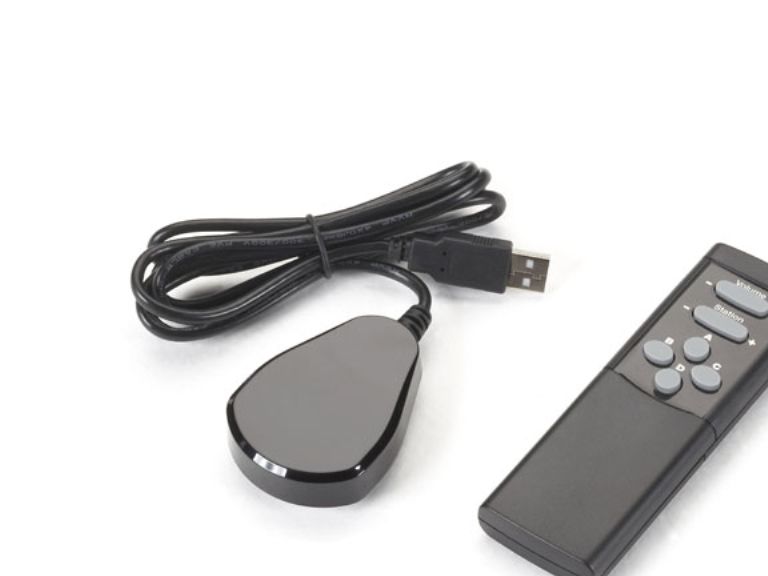
Control the content on your iCOMPEL digital signage easily with this handheld remote control unit.
With it added to your iCOMPEL system, you can control what content and messaging is being displayed on-screen at any time—right at the screen itself. There’s no need to log in to the user interface when you want to get a desired video or presentation to appear. At a press of a button, you can select the content you want and switch layouts previously set up in iCOMPEL.
What’s more, the remote control works right out of the box. Simply connect its IR receiver to a USB port on the iCOMPEL, and you have volume control in a matter of seconds.
Also, if you’re using an iCOMPEL model with a built-in video card and receiving signals from the TV tuner (or audio from the radio tuner), you can use the remote to scan the channel list or change the channel volume without any configuration or set up. Without the remote, this can be only done via the iCOMPEL user interface.
Ideal applications. Adding remote control functionality to your iCOMPEL is ideal for: - Museums and exhibit applications. - Signage used for sales presentations at trade shows. - Anywhere you frequently need to adjust volume.
It’s also great for giving viewers the ability to access content themselves, such as in: - PoS/PoP retail applications. - Hotels and conference centers. - Government offices and DMVs. - Doctors’ office and hospital waiting rooms.
In addition, it’s particularly useful in applications where installing touchscreen signage isn’t practical or affordable—especially if you just want to give an audience on-demand access to several slideshows of content.
Flexible content control by zone. Content can be switched inside a single zone or across multiple zones in sync. You can keep logos and branding fixed and uninterrupted in one part of the screen, while videos and other content in other zones can be flexibly changed by pushing a remote control button.
The four buttons on the remote are assignable. By assigning specific video clips and layouts to the buttons, they can be selected on demand. Choose a video to play in a zone when you want—for example, when an important customer arrives—then when it ends, that zone’s playlist content will resume play according to its preset schedule.
The buttons also integrate with features of iCOMPEL. Using the AdvanceTo feature, you can interrupt the playing of a playlist and jump to a specific item in the playlist.
You can also set up “pick lists” containing playlists of specific content, including certain TV stations or radio stations, for example. These pick lists appear in a dropdown menu on the iCOMPEL screen*. By restricting the selection to specific lists, you can prevent users from playing objectionable content through your signage.
* Not only can this function be enabled for access by users of the remote control, but it can also be enabled for any local user accessing content in Ad-Hoc mode via the iCOMPEL user interface.
NOTE: A no-charge license will be provided for activating IR functionality on your iCOMPEL model. Also, the remote control works only with iCOMPEL units running 8.1.1 firmware or above. For information on getting the necessary firmware, contact Black Box Tech Support or your Digital Signage Success Manager.
Käyttöliittymä
IR Langaton
Kauko-ohjaimen oikea käyttö
PC
Tuotteen väri
Musta
Syötön tyyppi
Painikkeiden painaminen
Taustavalaistut painikkeet
Ei
Mukautettavat painikkeet
Ei
Painikkeiden määrä
6
Yhteensopivuus
iCOMPEL
Sisäänrakennettu näyttö
Ei
Sisältää johdot
IR-tunnistin
USB vaaditaan
Kyllä
Vaatimustenmukaisuustodistukset
RoHS
Löydämme tuotteen järjestelmästämme helposti seuraavalla tuotenumerolla
SKU:
ICOMP-RC
Miksi samalla tuotteella on monta eri tuotesivua tai tuotenumeroa?
Valmistajat usein julkaisevat saman tuotteen monella eri tuotenumerolla. Usein eroa on vain pakkauksessa. Eri tuotepakkaus saattaa olla suunniteltu eri valtioille.
Yritämme parhaamme mukaan laittaa samat tuotteet saman tuotenumeron alle, mutta joskus sama tuote on eri tuotenumeroilla sivullamme.