Ilmoita minulle, kun tuotetta on jälleen tarjolla varastossa
Email:
Varastovahti on luotu. Lähetämme sähköpostin kun tuotetta on taas varastossa.
Tämä toiminto vaatii sisäänkirjautumisen. Luo käyttäjä ja voit käyttää listojamme esim. säännöllisiä ostoksia ja toivelistoja varten Luo käyttäjä Kirjaudu

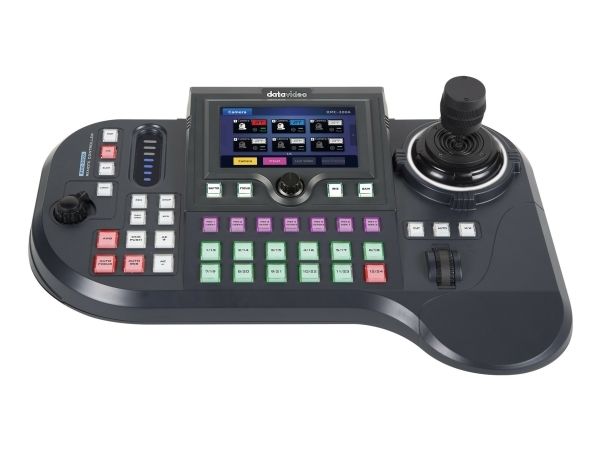
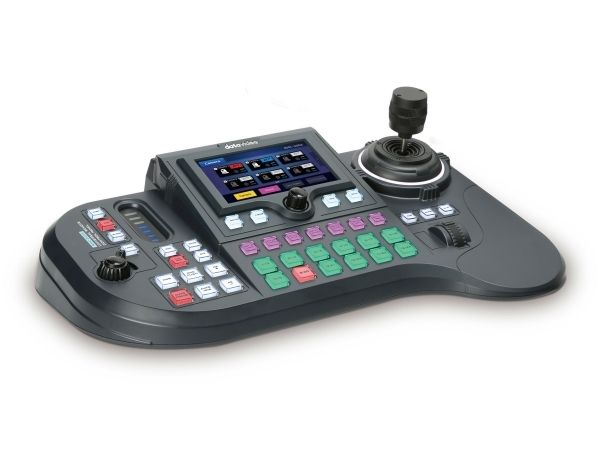
A Multi-Functional Multi-Camera Controller The Datavideo RMC-300A stands out as a multi-functional multi-camera controller with advanced control protocols. It supports various control protocols such as Sony VISCA, VISCA over IP-S, VISCA over IP-C, and Datavideo DVIP.
With the capability to control up to 24 Datavideo PTZ and block cameras via DVIP or up to 8 Datavideo cameras through serial RS-422 transmission, the RMC-300A provides unparalleled flexibility.
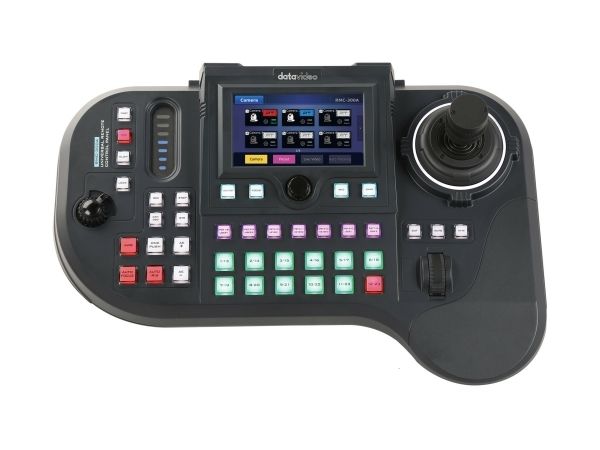
Its user-friendly interface on a 5” touch panel, combined with hardware buttons, empowers users to efficiently manage complex EFP workflows without compromise.
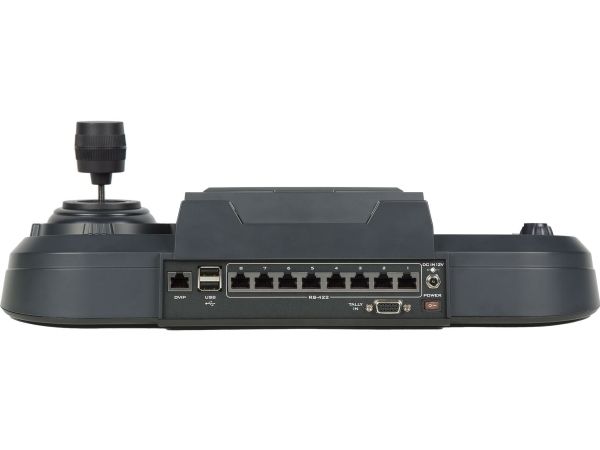
RMC-300A 360° Product View The Datavideo RMC-300A camera controller features dual USB 2.0 ports for expanded device connectivity, a 10/100Mbps Ethernet port with an RJ-45 connector for reliable network integration, and eight RS-422 ports (RJ-45 connectors) that enhance compatibility with various devices.
User friendly interface on 5-inch LCD touch panel 5-inch LCD touch panel design allows users to easily control settings of each cameras. The Datavideo RMC-300A camera controller features dual USB 2.0 ports for expanded device connectivity, a 10/100Mbps Ethernet port with an RJ-45 connector for reliable network integration, and eight RS-422 ports (RJ-45 connectors) that enhance compatibility with various devices.
Control up to 24 Cameras Designed to control up to 24 cameras, with 7 preset memories for each camera for easy camera operation.
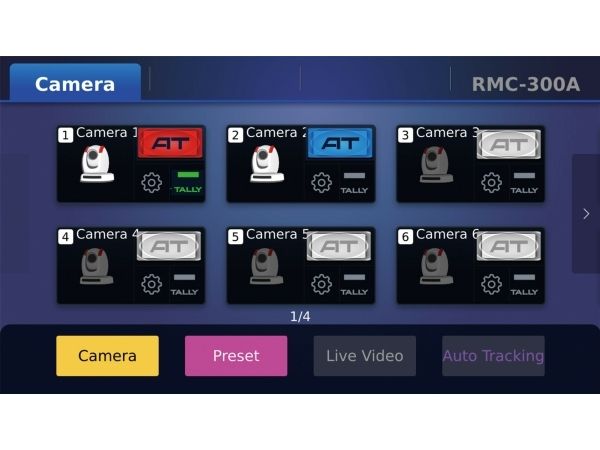
LCD displays GUI for Operability and Visibility Easily access to all the cameras setting, and call back your favorite settings such as Shutter, Focus, IRIS, Gain, Zoom, and movement speeds.
Enhanced Auto Tracking Capabilities The RMC-300A's Auto Tracking (AT) menu has been upgraded to allow more precise subject tracking. Operators can now select specific objects to track on the screen and adjust the tracking speed for smoother camera movement. Positional options include left third, right third, or center frame placement, providing better compositional control. Additionally, the tracking can be set for full body, half body, or close-up framing, enhancing the adaptability of the camera for various live production scenarios. These enhancements make the auto-tracking feature more versatile and effective for dynamic broadcasts.
Direct Access to Auto Tracking Features Gain immediate access to the auto tracking feature using a range of external controllers.
Beyond traditional camera controls, activating auto tracking on SHOWCAST 100 is also straightforward and convenient.
Smart PTZ Speed Adaptation The integrated PID algorithm is able to detect the movement speed of the identified object and automatically adjust the camera's corresponding pan, tilt and zoom speeds in such a way that the lens movement will be smooth, avoiding common camera lens movement problems like jerky movements or unpredicted halts.
Talent Position: Center / Left Side / Right Side The positioning of talent depends on the videographer’s creativity and intent rather than strict rules. Different positions can convey various emotions, messages, or visual effects. A centered composition provides a sense of stability and balance, suitable for scenes that require highlighting the main subject. Videographers may also place the talent on the left third or right third of the frame, leaving adequate space in the foreground to showcase the talent’s sight direction or potential future possibilities.
Quick Access to Framing Options All Datavideo PTC Camera with AutoTracking include the RMC-1AT controller. User can quickly select full-body , half-body and close up framing, making it easy to change the shooting scene and framing requirements.
Image Key and Graphic Key The RMC-300A from Datavideo features Image Key and Graphic Key functionalities, enhancing user interaction and workflow efficiency. Image Key allows operators to use camera screenshots as placeholders on the selection menu, simplifying the process of switching views during live events. Meanwhile, Graphic Key uses pre-loaded graphics to label camera feeds, aiding directors in managing complex setups. Together, these tools streamline operations and improve multi-camera control precision during productions.
Live Video Feed Directly on Touchscreen The RMC-300A supports live video preview on its screen via RTSP (Real Time Streaming Protocol), enabling operators to stream and monitor video feeds directly from the controller. This feature eliminates the need for extra software or hardware, crucial for real-time monitoring during live events and broadcasts, where quick decision-making is key.
Professional Use Single person control of Pan, Tilt, and Zoom is possible with the 2-axis Joystick and the zoom knob. Easily access all the cameras settings in the OSD, and call back your favorite settings such as Shutter, Focus, IRIS, Gain, Zoom, and movement speeds.
3 Speed Settings: Fast, Medium, and Slow The 7-position memory can also be set to display 3 speeds: Fast, Medium, and Slow, meeting the filming techniques of broadcasting, ensuring that even PTZ cameras can match the dynamic video effects presented by professional video cameras.
Remote Control via Ethernet or serial port RS-422 The RMC-300A can control PTZ and block cameras, as well as robotic camera heads such as the Datavideo PTR-10 series by using the DVIP or RS-422 interfaces.
Can control up to 8 cameras via RS-422 or 24 cameras via DVIP.
Zoom knob and lock button Easy to use knob for the camera to zoom in/out, and the Lock button to help you secure the position of the joystick and the zoom knob.
Tutorial videos created specifically for the RMC-300A Datavideo Academy is a comprehensive learning platform established by Datavideo Technology. As a professional Broadcast and AV equipment manufacturer, Datavideo Technology is not only committed to providing quality products to users, but also has the responsibility to help users learn to operate Datavideo products.
Through the Datavideo Academy platform, users can easily master the operation of Datavideo products and experience the unique design of Datavideo products, further creating a variety of applications and bringing a good user experience. Now, a tutorial video for the RMC-300A is available at Datavideo Academy to help you get the best performance out of the product. Please click on the following link.
Sisäänrakennettu näyttö
Kyllä
Näytön tyyppi
LCD
Näytön halkaisija
12,7 cm (5")
Näytön erottelutarkkuus
1280 x 720 pikseliä
Tuotteen väri
musta
Ohjaustyyppi
Painikkeet, Ohjaussauva
Ethernet LAN
Kyllä
Ethernet LAN -datanopeudet
10,100 Mbit/s
Lukumäärä per pakkaus
1 kpl
RJ-45 porttien määrä
1
RS-422/485-portit
8
Virtalähteen malli
DC
Tehonkulutus (maks.)
19 W
DC-syöttöjännite
12 V
Tuotteen leveys
420 mm
Tuotteen syvyys
294 mm
Tuotteen korkeus
134 mm
Paino
1,5 kg
Käyttölämpötila (T-T)
0 - 40 °C
Varastointilämpötila
10 - 60 °C
Käytön suhteellinen kosteus (H-H)
10 - 80%
Virtalähde mukana
Kyllä
Löydämme tuotteen järjestelmästämme helposti seuraavalla tuotenumerolla
UPC:
672255008676
EAN:
0672255008676
SKU:
2205-1801
Miksi samalla tuotteella on monta eri tuotesivua tai tuotenumeroa?
Valmistajat usein julkaisevat saman tuotteen monella eri tuotenumerolla. Usein eroa on vain pakkauksessa. Eri tuotepakkaus saattaa olla suunniteltu eri valtioille.
Yritämme parhaamme mukaan laittaa samat tuotteet saman tuotenumeron alle, mutta joskus sama tuote on eri tuotenumeroilla sivullamme.