Ilmoita minulle, kun tuotetta on jälleen tarjolla varastossa
Email:
Varastovahti on luotu. Lähetämme sähköpostin kun tuotetta on taas varastossa.
Tämä toiminto vaatii sisäänkirjautumisen. Luo käyttäjä ja voit käyttää listojamme esim. säännöllisiä ostoksia ja toivelistoja varten Luo käyttäjä Kirjaudu
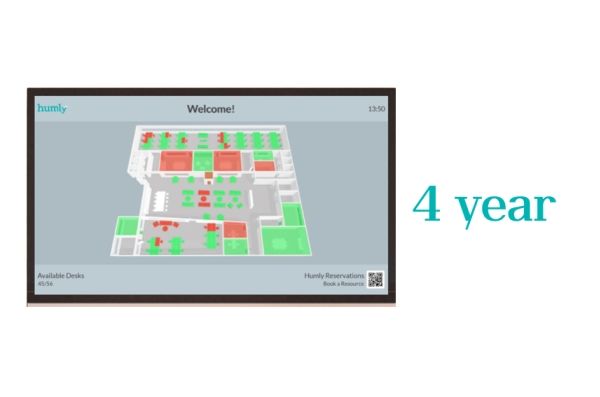
Imagine that you need a room or a desk. Instead of having to run up and down every floor to check availability, a 3D overview of each floor gives you all the answers. Use the passive mode on a big screen or manage your bookings in the interactive mode.
Now you can pick up your phone to book the room or desk you need ad hoc. If you’re outside the office, you can use Humly Floor Plan both to check availability and manage the bookings in your booking system, Teams or Humly Reservations.
Humly Floor Plan saves office workers and their guests a whole lot of time and frustration. And facility managers get an overview of usage status in real time, any time.
Instant answers Humly Floor Plan answers a lot of questions in an instant. For example: • Which meeting rooms are available? • Where can I find a desk to work from? • What is the occupancy of level B right now?
Check green or red and book The 3D floor plan visualization gives a bird’s-eye view of a whole office floor with all bookable items. The interface needs no explanation. Green means available, red means occupied. There are two modes: • Passive mode shows occupancy and availability on a big screen. • Interactive mode does all of the above, plus lets you book what’s available by tapping on the screen. Access Humly Floor Plan through Teams using a single sign-on, if you have Office 365 or Microsoft Exchange as your booking system.
Book anything Add and configure any bookable resources to your floor plan, like parking spaces.
Customize visuals Add your logo and control customized messages that you wish to show on the floor plan visualization in passive mode. Combine with Humly Wayfinding Humly Floor Plan can be combined with Humly Wayfinding, guiding people from point A to B in an intuitive way.
Get started To get started, email your existing floor plans to your sales contact as a .jpg, .png, .gif or .pdf file for processing. This requires some manual fine-tuning, so please allow the process a few days for quality assurance. When all is set and done, you will receive an email with the Floor Map ID and Client token of your floor plans. Use them to map up your rooms and desks in the Humly Control Panel.
Upcoming: sensor integration We are working on integrating sensors with the floor plans to be able to visualize data like air quality, temperature and human presence further down the line. Of course, we will offer an open API for you to be able to choose any sensor platform you wish.
Less friction, more focus At Humly, we believe that the best way to optimize our customers’ time and resources is to get out of the way. The minimalistic and user- friendly design of Humly Floor Plan reduces friction and creates more time for focus.
Tuotekuvaus
Humly Floor Plan - tilauslisenssi (4 vuotta) - 1 lisenssi
Tuotteen tyyppi
Tilauslisenssi - 4 vuotta
Luokka
Verkko- ja kojeistonmukaiset palvelut - työtilojen hallinta
Asennustyyppi
Isännöity - SaaS
Lisenssien määrä
1 lisenssi
Generelt
Tuotteen tyyppi
Jamless Play, Silent Play, M-DISC-støtte, Running Optimize Power Control Circuit
Löydämme tuotteen järjestelmästämme helposti seuraavalla tuotenumerolla
SKU:
HUM50044
Miksi samalla tuotteella on monta eri tuotesivua tai tuotenumeroa?
Valmistajat usein julkaisevat saman tuotteen monella eri tuotenumerolla. Usein eroa on vain pakkauksessa. Eri tuotepakkaus saattaa olla suunniteltu eri valtioille.
Yritämme parhaamme mukaan laittaa samat tuotteet saman tuotenumeron alle, mutta joskus sama tuote on eri tuotenumeroilla sivullamme.